

VSC安装教程
当你看这个教程的时候,我就知道你已经不想再用上世纪的软件了
下面是安装教程。
一.安装
VSCodeUserSetup-x64-1.97.2.exe是windows版
VSCode-darwin-universal.zip是mac版(mac版的孩子先自己看网上教程吧,我这边后续有空了再更新)
直接点击安装就行
注意!需要勾选添加到path!!!!!!!!!!
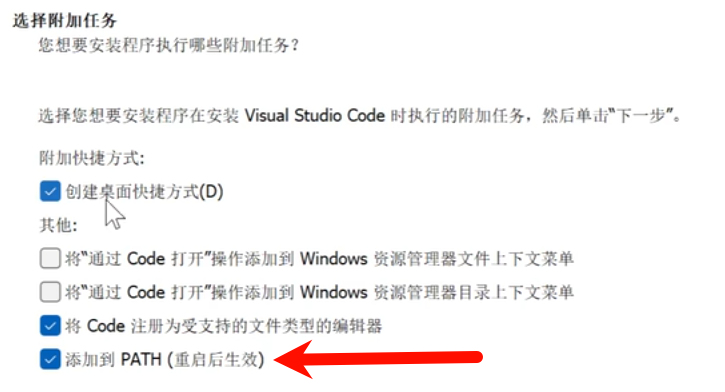 然后重启一下。
二.配置(包括汉化)
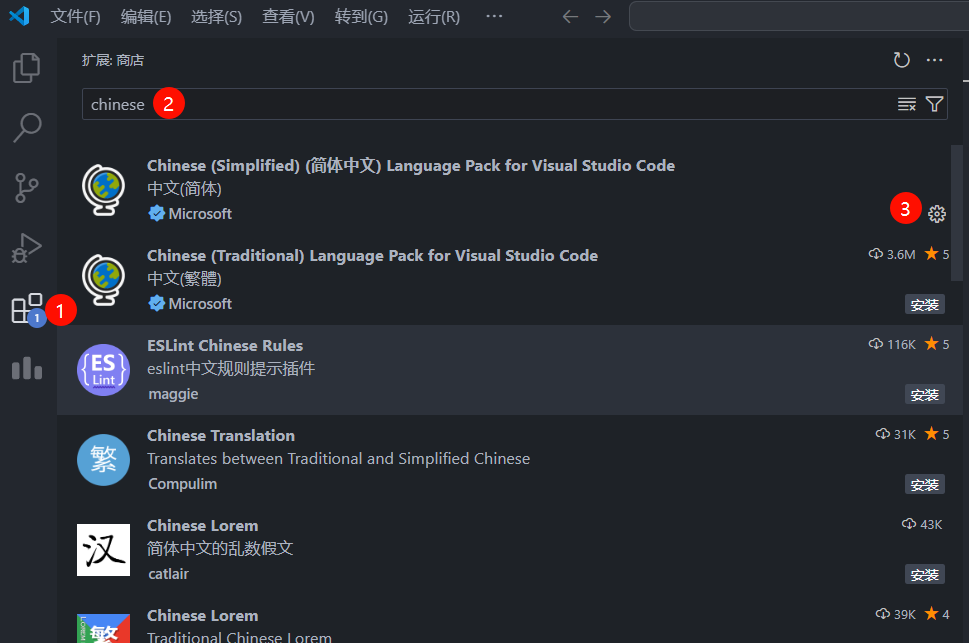
1.汉化
按照图片中的步骤点击安装
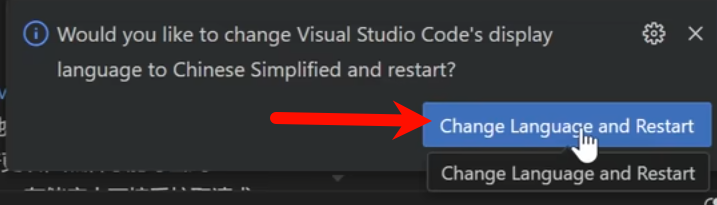
之后点击右下角的按键即可。
2.安装mingw64
将安装包中的mingw64放到C:\Program Files下
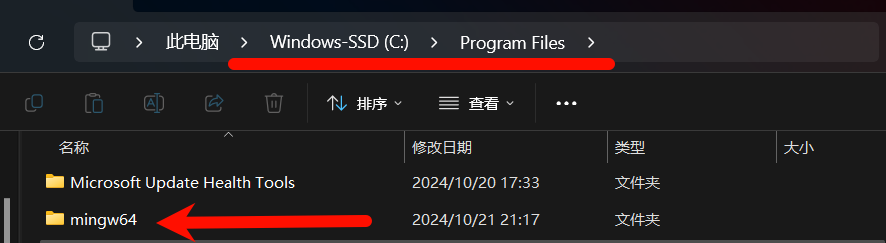
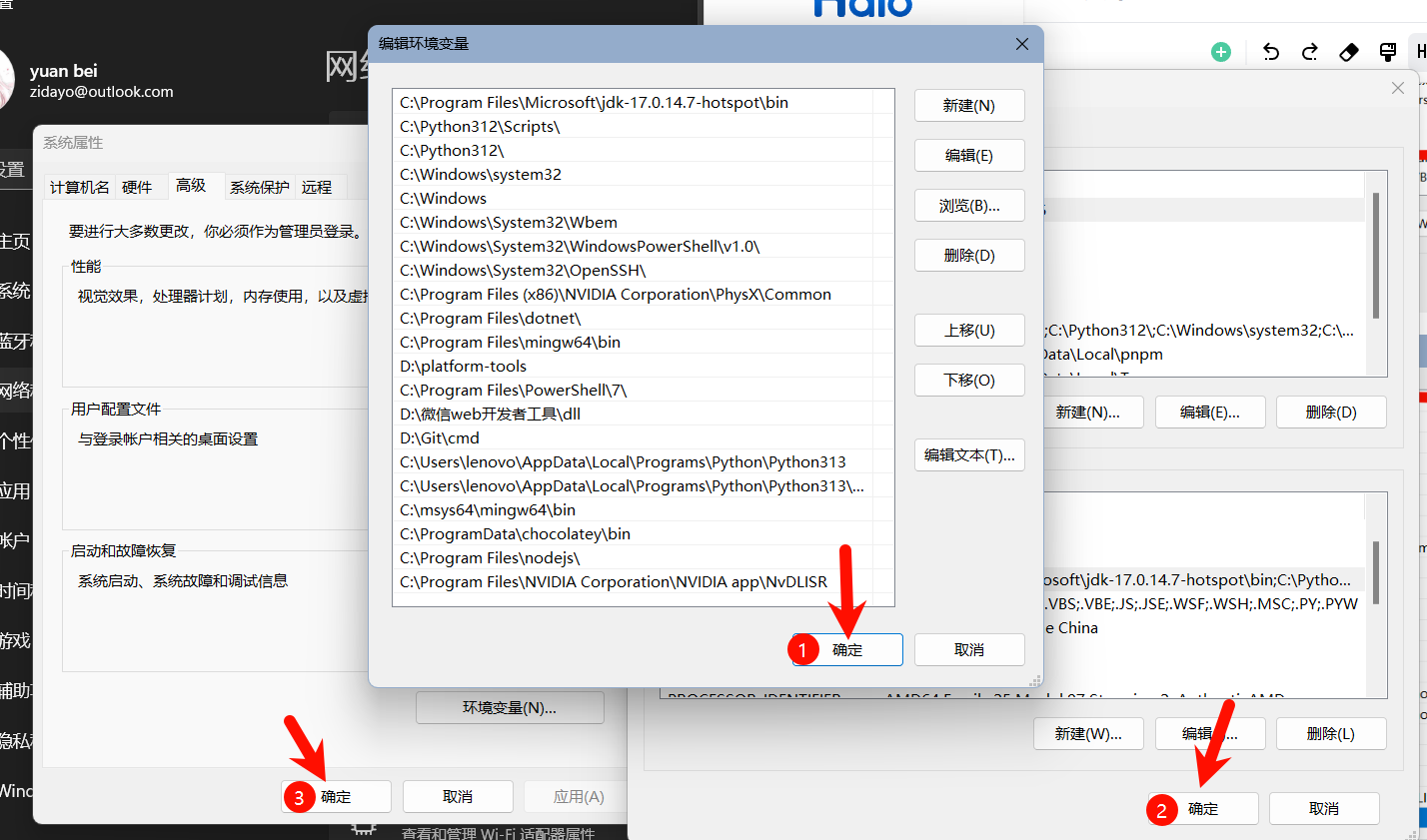
之后,win+i打开设置,搜索“高级系统设置”,依次点击“环境变量“,双击”path“
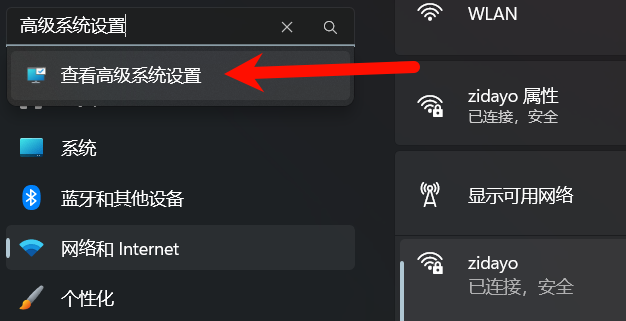
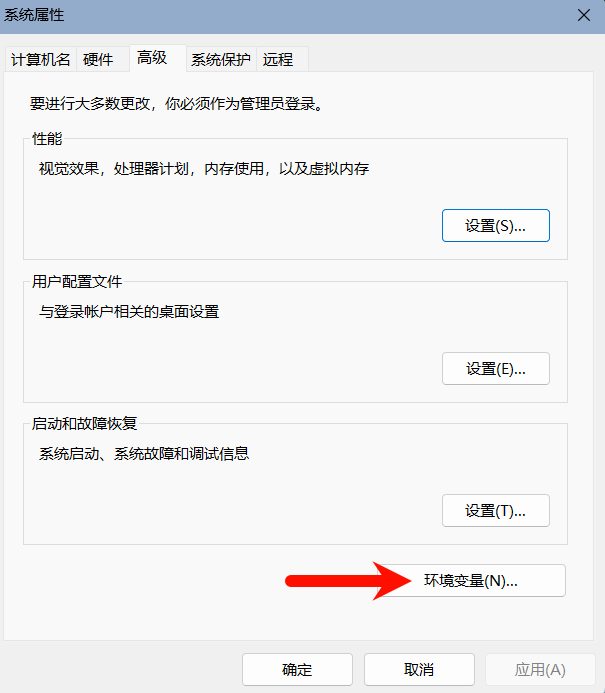
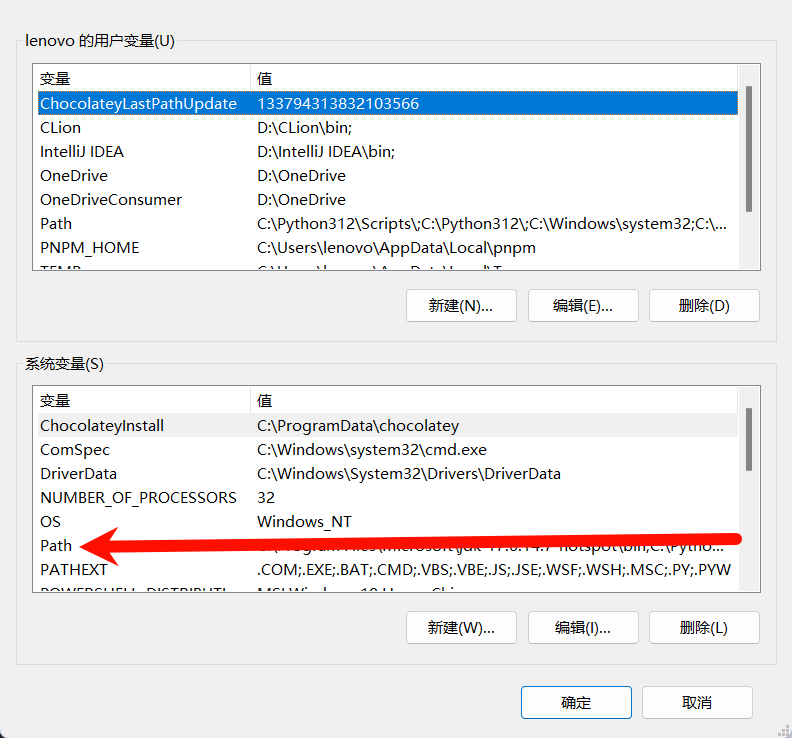
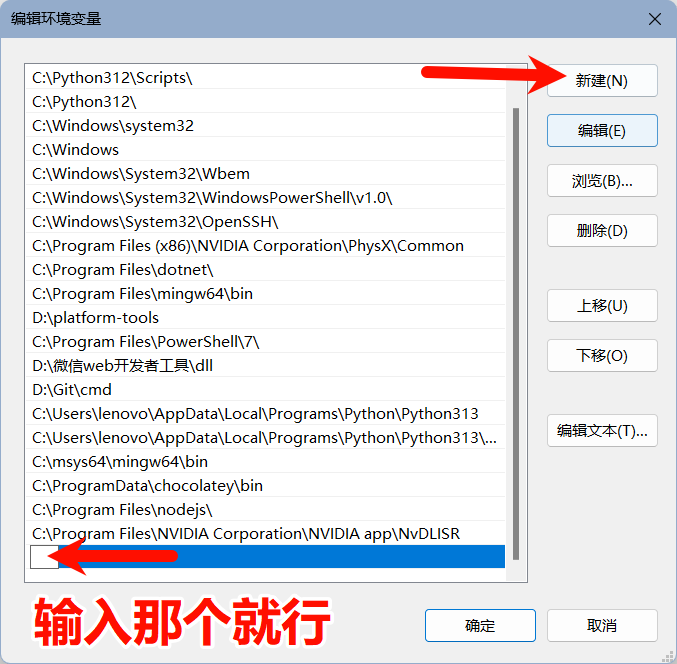
输入下面代码框的这个
C:\Program Files\mingw64\bin之后是点击三个确定,必须都点“确定”!!!不然无效
3.点开任意.c文件(你可以自己创建一个)
直接把以前的程序文件拖入vsc也可以
第二步,点击键盘上的F6
第三步,点击下面图片中的第一个就行
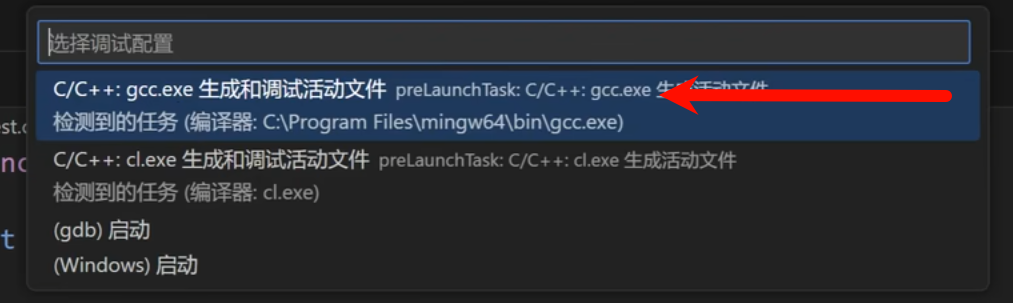
之后他的右下角会提示你安装一堆东西,照做就行
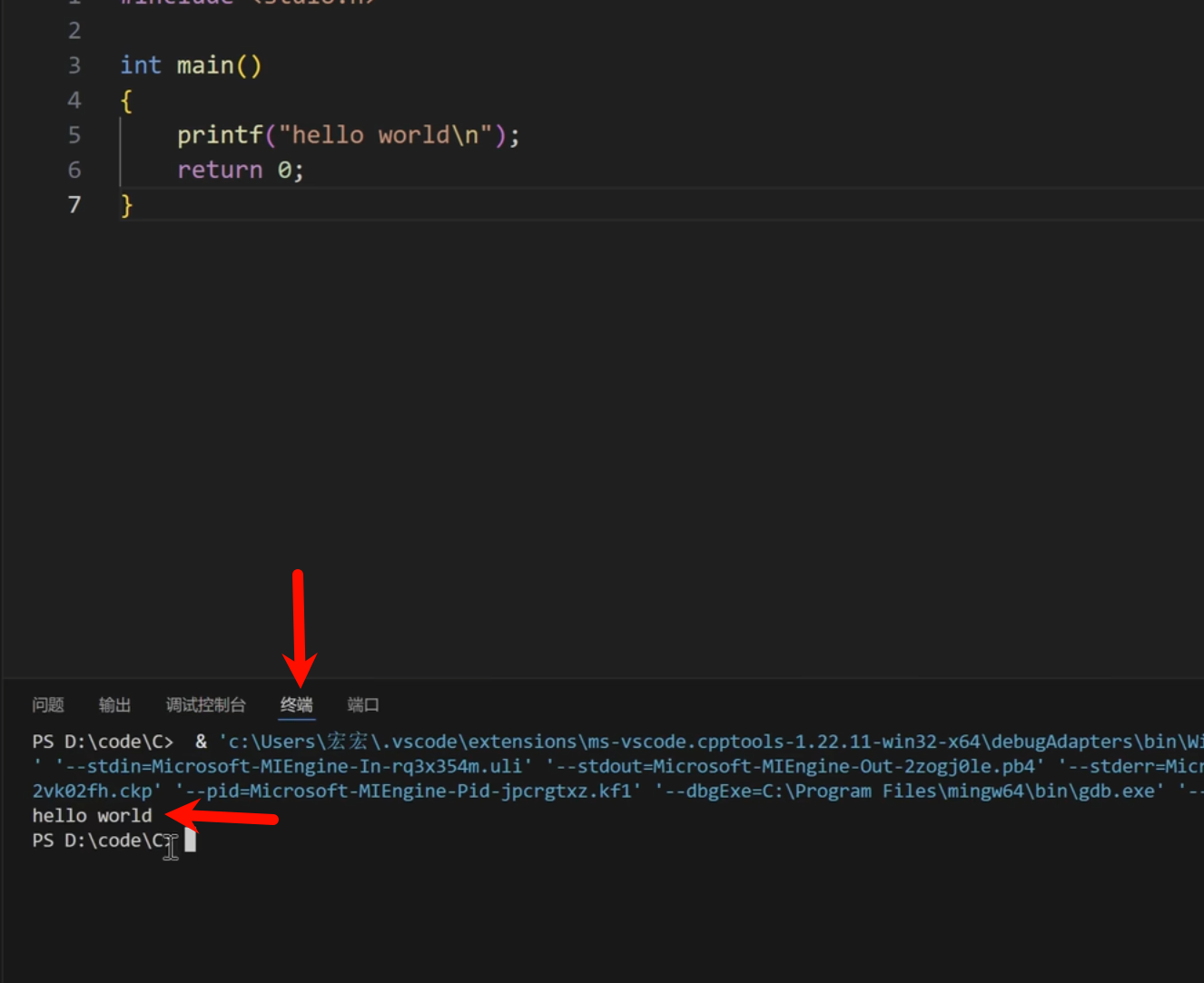
然后重启后你再按F6运行,应该是成功的。
在终端里面会显示运行结果。
以上这些网上都有教程,不明白自己搜教程,这里分享一个
Visual Studio Code安装配置C/C++教程,VSCode调试教程,VSCode安装使用教程,VSCode配置c/c++,MinGW下载安装_哔哩哔哩_bilibili
接下来是主菜,讲点私货23333
三.美化+体验优化(主要是一些插件推荐)
1.settings设置
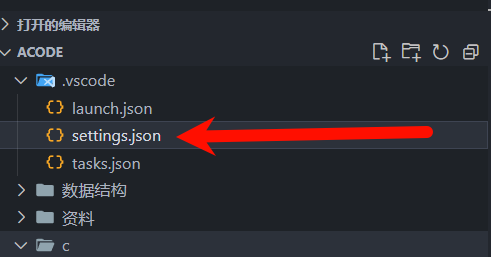
你打开的文件夹应该会有这个玩意,这里是我里面的配置,直接粘贴进去就行
{
    "files.autoSave": "afterDelay",
    "files.autoGuessEncoding": true,
    "workbench.list.smoothScrolling": true,
    "editor.cursorSmoothCaretAnimation": "on",
    "editor.smoothScrolling": true,
    "editor.cursorBlinking": "smooth",
    "editor.mouseWheelZoom": false,
    "editor.formatOnPaste": true,
    "editor.formatOnType": true,
    "editor.formatOnSave": true,
    "editor.wordWrap": "on",
    "editor.guides.bracketPairs": true,
    "editor.suggest.snippetsPreventQuickSuggestions": false,
    "editor.suggestSelection": "recentlyUsed",
    "debug.showBreakpointsInOverviewRuler": true,
    "editor.suggestOnTriggerCharacters": true,
    "editor.quickSuggestions": {
        "other": true,
        "comments": true,
        "strings": true
    },
    "files.associations": {
        "random": "c",
        "stdio.h": "c",
        "iostream": "cpp",
        "array": "cpp",
        "atomic": "cpp",
        "*.tcc": "cpp",
        "bitset": "cpp",
        "cctype": "cpp",
        "cfenv": "cpp",
        "charconv": "cpp",
        "chrono": "cpp",
        "cinttypes": "cpp",
        "clocale": "cpp",
        "cmath": "cpp",
        "codecvt": "cpp",
        "complex": "cpp",
        "condition_variable": "cpp",
        "csetjmp": "cpp",
        "csignal": "cpp",
        "cstdarg": "cpp",
        "cstddef": "cpp",
        "cstdint": "cpp",
        "cstdio": "cpp",
        "cstdlib": "cpp",
        "cstring": "cpp",
        "ctime": "cpp",
        "cuchar": "cpp",
        "cwchar": "cpp",
        "cwctype": "cpp",
        "deque": "cpp",
        "forward_list": "cpp",
        "list": "cpp",
        "unordered_map": "cpp",
        "unordered_set": "cpp",
        "vector": "cpp",
        "exception": "cpp",
        "algorithm": "cpp",
        "functional": "cpp",
        "iterator": "cpp",
        "map": "cpp",
        "memory": "cpp",
        "memory_resource": "cpp",
        "numeric": "cpp",
        "optional": "cpp",
        "ratio": "cpp",
        "regex": "cpp",
        "set": "cpp",
        "string": "cpp",
        "string_view": "cpp",
        "system_error": "cpp",
        "tuple": "cpp",
        "type_traits": "cpp",
        "utility": "cpp",
        "fstream": "cpp",
        "future": "cpp",
        "initializer_list": "cpp",
        "iomanip": "cpp",
        "iosfwd": "cpp",
        "istream": "cpp",
        "limits": "cpp",
        "mutex": "cpp",
        "new": "cpp",
        "ostream": "cpp",
        "scoped_allocator": "cpp",
        "shared_mutex": "cpp",
        "sstream": "cpp",
        "stdexcept": "cpp",
        "streambuf": "cpp",
        "thread": "cpp",
        "typeindex": "cpp",
        "typeinfo": "cpp",
        "valarray": "cpp",
        "stdlib.h": "c",
        "string.h": "c",
        "math.h": "c"
    }
}
2.插件推荐
1.cph 做题非常好用,推荐指数五颗星兄弟,可以自己设置样例,一键全部运行

用法,点开一个题,点击
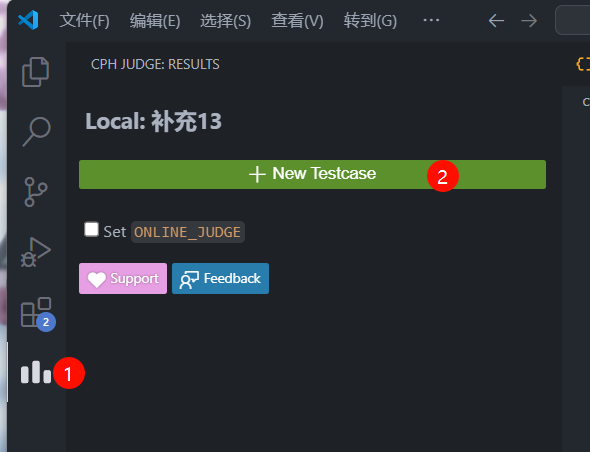
你就会用了,很简单
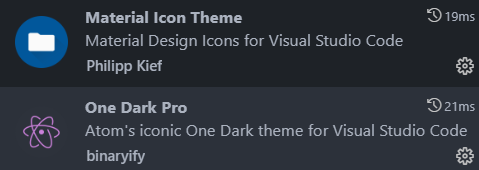
2.主题包(两个)(美化的,没什么好说的,不喜欢可以不装)
最后,指一条路
【教程】vscode优化体验篇(推荐设置 && 推荐插件)_哔哩哔哩_bilibili
可以自己看看有没有喜欢的,我这里只给了两个我认为非常好用的
3.如果你是一个懒人~~
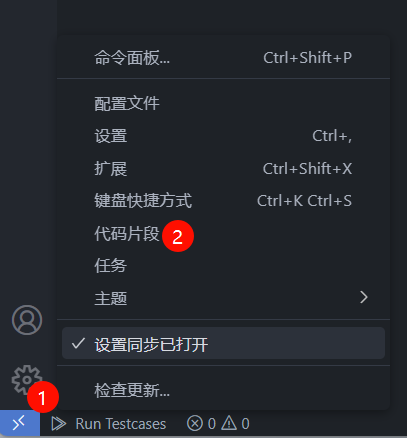
可以点击代码片段
为你的c和cpp文件添加一个预先写好的,可以一键输入的片段
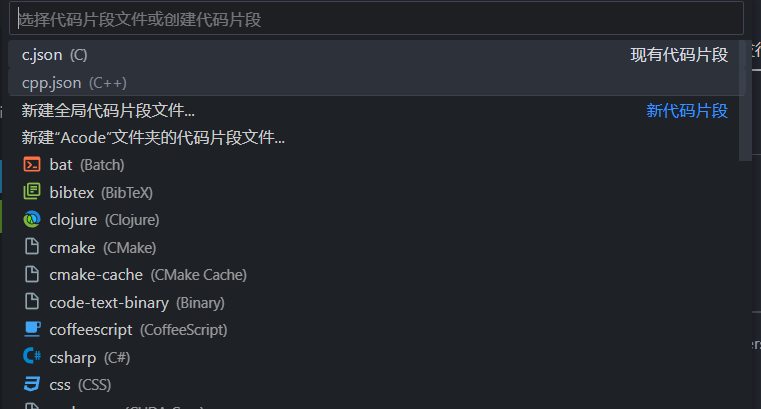
这里分享一下我的
cpp的!
{
	// Place your snippets for cpp here. Each snippet is defined under a snippet name and has a prefix, body and
	// description. The prefix is what is used to trigger the snippet and the body will be expanded and inserted. Possible variables are:
	// $1, $2 for tab stops, $0 for the final cursor position, and ${1:label}, ${2:another} for placeholders. Placeholders with the
	// same ids are connected.
	// Example:
	// "Print to console": {
	// 	"prefix": "log",
	// 	"body": [
	// 		"console.log('$1');",
	// 		"$2"
	// 	],
	// 	"description": "Log output to console"
	// }
	"Print to console": {
		"prefix": "#all",
		"body": [
			"#include <iostream>",
			"#include <algorithm>",
			"#include <cstring>",
			"using namespace std;",
			"const int N = 10010;",
			"",
			"",
			"",
			"int main()",
			"{",
			"",
			"",
			"    return 0;",
			"}"
		],
		"description": "初始化"
	}
}
c的!
{
	// Place your snippets for c here. Each snippet is defined under a snippet name and has a prefix, body and
	// description. The prefix is what is used to trigger the snippet and the body will be expanded and inserted. Possible variables are:
	// $1, $2 for tab stops, $0 for the final cursor position, and ${1:label}, ${2:another} for placeholders. Placeholders with the
	// same ids are connected.
	// Example:
	// "Print to console": {
	// 	"prefix": "log",
	// 	"body": [
	// 		"console.log('$1');",
	// 		"$2"
	// 	],
	// 	"description": "Log output to console"
	// }
	"Print to console": {
		"prefix": "#all",
		"body": [
			"#include <stdio.h>",
			"#include <math.h>",
			"#include <string.h>",
			"",
			"",
			"",
			"int main()",
			"{",
			"",
			"",
			"    return 0;",
			"}"
		],
		"description": "初始化"
	}
}
如此一来,我们在写程序时,只需输入“#all”,敲下回车!
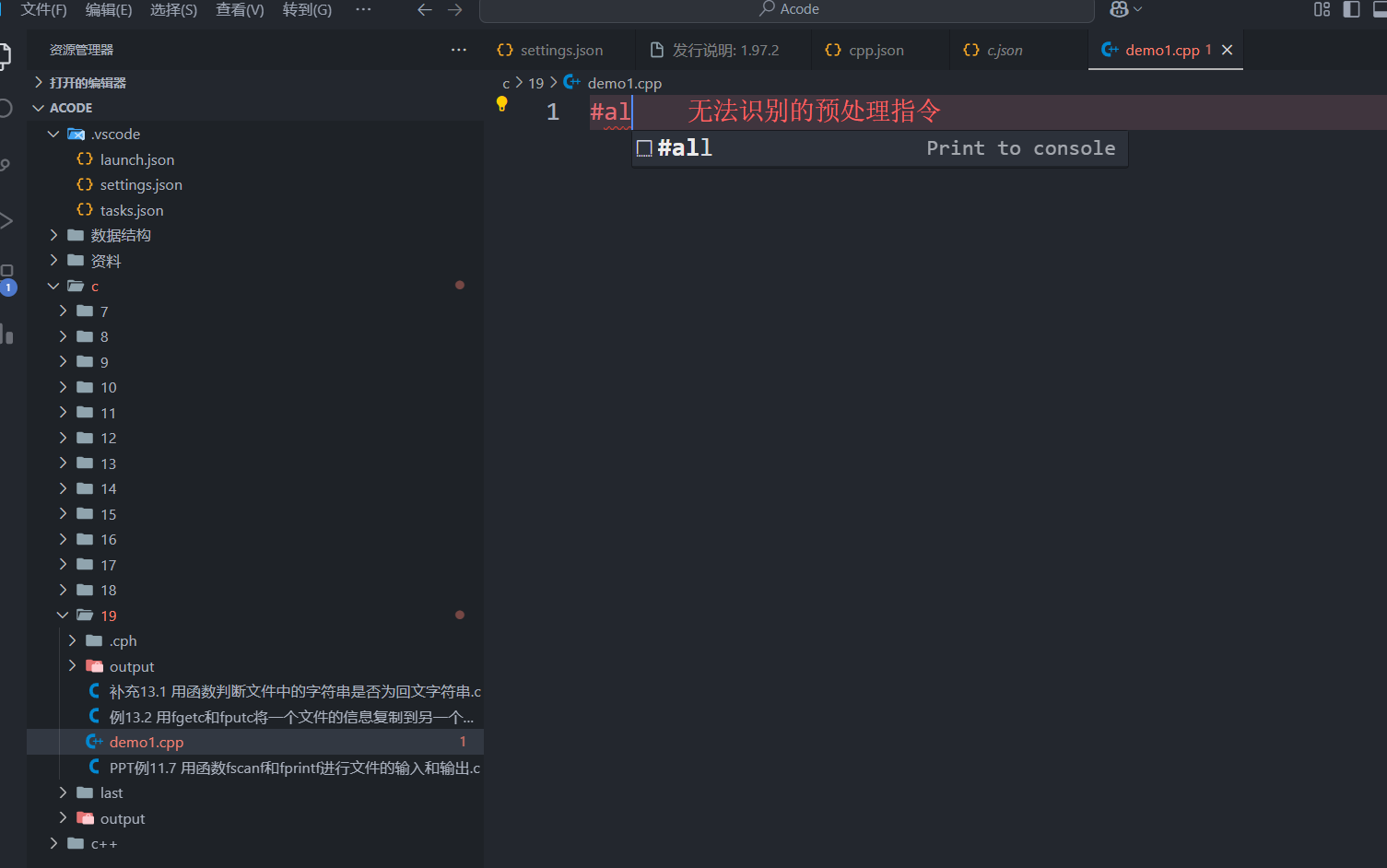
就是见证奇迹的时刻!!!
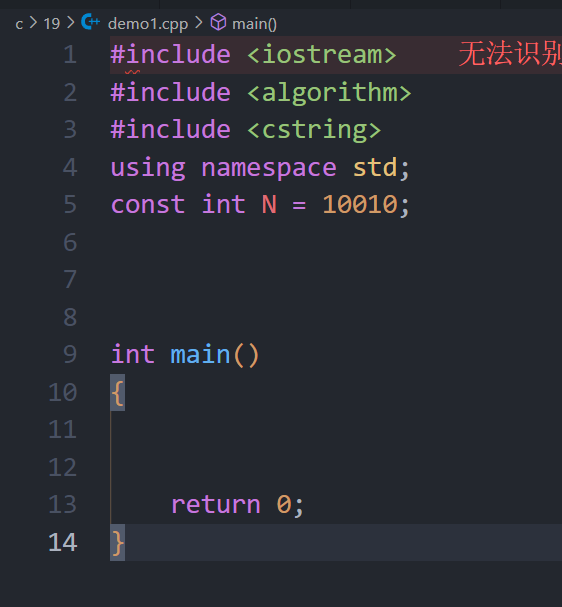
哈哈哈哈,是不是懒人专属!!!芜湖
就酱,有啥问题可以call我